Website Issue - Overview Solution
solution preview
Show All Issues

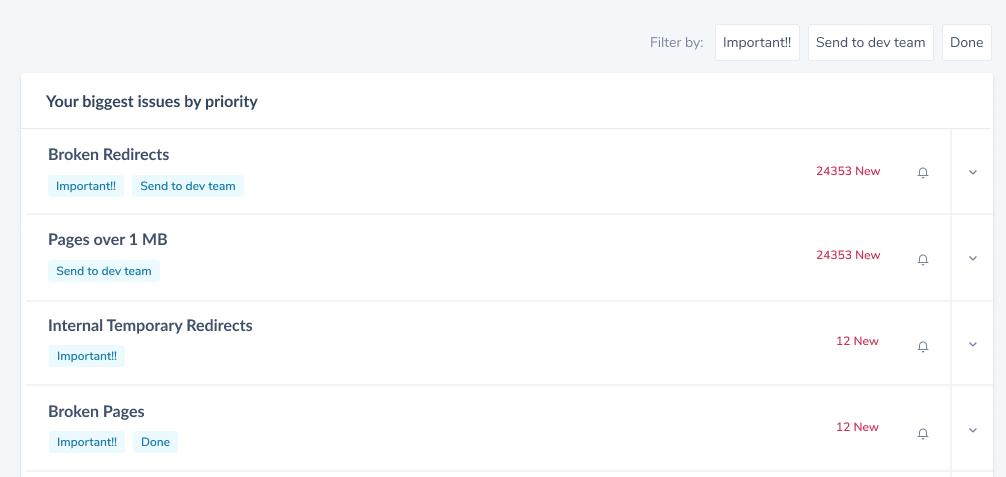
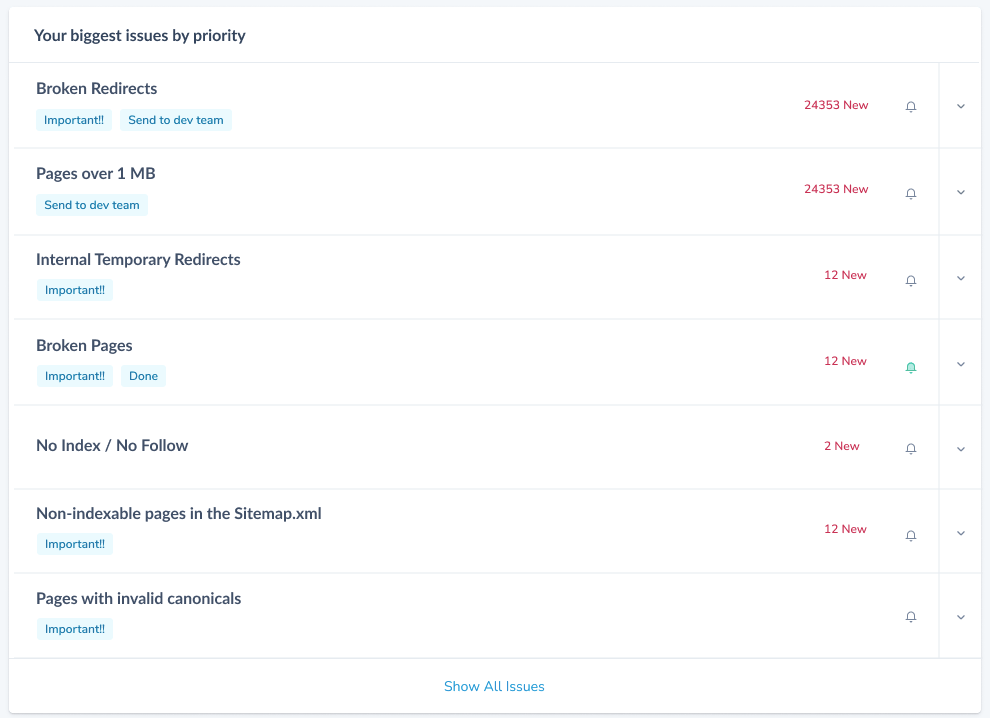
Your biggest issues by priority


Category

SEO

Content Qulaity


Broken Redirects
Pages over 1 MB
Internal Temporary Redirects
Broken Pages
No Index / No Follow
Non-indexable pages in the Sitemap.xml
Pages with invalid canonicals


24353 New
24353 New
12 New
12 New
2 New
12 New
SEO


www.myproject.com


Website Quality
Website Quality
SEO
Website Quality
Website Quality
Website Quality
Website Quality
Show All Issues

Your biggest issues by priority


Broken Redirects
Pages over 1 MB
Internal Temporary Redirects
Broken Pages
No Index / No Follow
Non-indexable pages in the Sitemap.xml
Pages with invalid canonicals


24353 New
24353 New
12 New
12 New
2 New
12 New
Important!!
Important!!
Important!!
Done
Important!!
Important!!
Send to dev team
Send to dev team
Filter by:
Important!!
Send to dev team
Done

Website Quality
Content Quality
SEO


10%
-5%
+25%
55%
100%
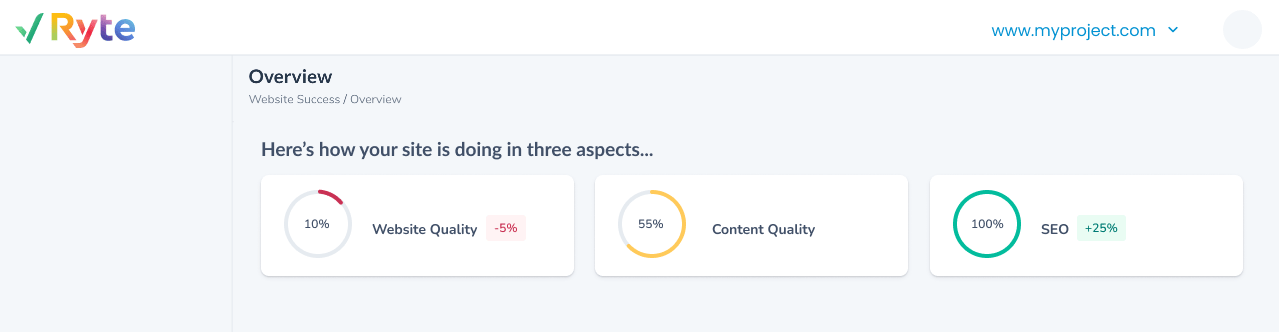
Here’s how your site is doing in three aspects...


www.myproject.com


230 resolved
120 resolved
4 new errors
24353
24353
12
Your biggest issues by priority

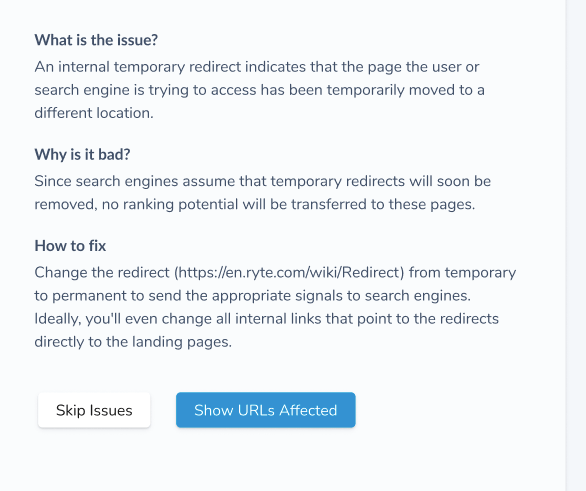
What is the issue?
Why is it bad?
How to fix
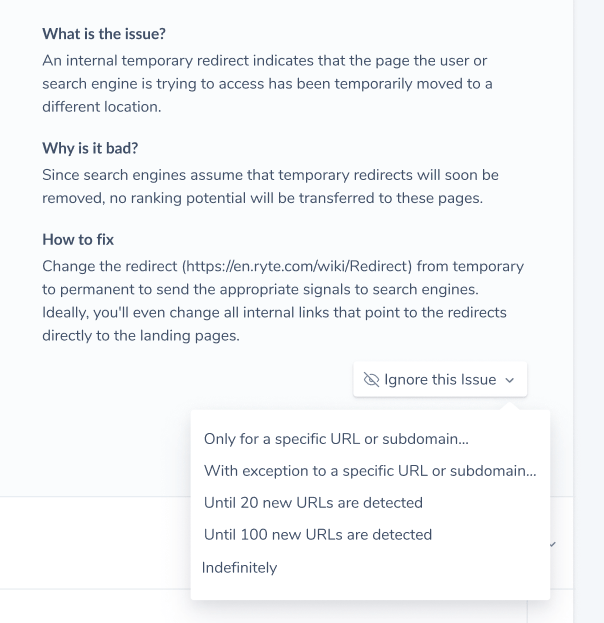
An internal temporary redirect indicates that the page the user or search engine is trying to access has been temporarily moved to a different location.
Since search engines assume that temporary redirects will soon be removed, no ranking potential will be transferred to these pages.
Change the redirect (https://en.ryte.com/wiki/Redirect) from temporary to permanent to send the appropriate signals to search engines. Ideally, you'll even change all internal links that point to the redirects directly to the landing pages.
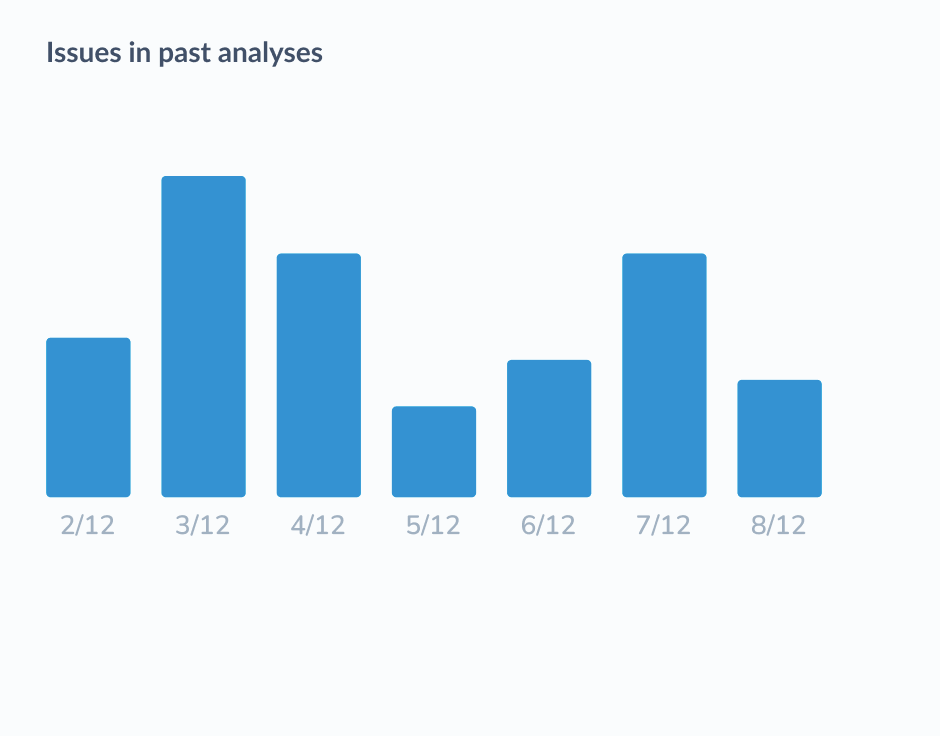
Issues in past analyses

2/12
3/12
4/12
5/12
6/12
7/12
8/12
Website Quality
Website Quality
SEO

Website Quality
Show URLs Affected
Skip Issues


GmbH
Ryte is a web-based tool and all-in-one platform for website quality assurance and SEO. We give SEOs a holistic perspective of the overall health of their website, from addressing technical issues such as broken pages or redirects, giving legal compliance assistance under GDPR and providing performance analyses for their entire domain.
.
To provide some context;
Users are faced with 1000s of issues on their website that they need to fix:
Users spend a long time analysing issues on their website, often they can be overwhelmed by too many issues and it is difficult to identify new issues in order to focus on fixing those or to validate if old issues have been fixed.
The need to show Users what website issues to fix or focus on first
Faced with 1000s of issues to fix , Prioritising what issue to fix first was one of the biggest challenges facing website owners and Technical SEOs (our users).
Problem Statement

With the implementation of the Website issue overview feature, Users will now be able to see the URLs that newly have an issue, as well as URLs that were recently fixed, get an overview on what these issues are about and recommendations on how to fix them.
The Ryte Solution:
How does this Feature benefit our Users when implemented?
- With this feature, users can get a quick Overview of their website in terms of SEO (Search Engine Optimisation), Content and Website Quality.
- With this feature, users would be able to efficiently identify what URLs on their websites have new issues and which issues have been resolved from past check ups or crawls.
- With this feature, users would get detailed descriptions on why each identified issue is bad for their websites and fix recommendations.
- This feature affords users the capability to prioritise and focus on high priority and high risk website issues to fix.
User Benefits

What does the Business (Ryte GmbH) stand to potentially benefit from this Feature?
- Increase our conversion to upsell for free & paid users.
- Our Users get to analyse and audit their websites more often.
- The more frequently our Users analyse and audit their websites, the happier they will be and consequently more revenue for Ryte GmbH.
- Stay competitive with the features from competitors.
Business Value

What customer profile is this feature for?
Defining the Customer Profile:
customer profile
👤 Target User Group
Technical SEOs

Website Owners
🧳💼 Available to which Ryte Packages?
Basic

Business
Enterprise
Do similar implementations exist from our top 3 competitors?
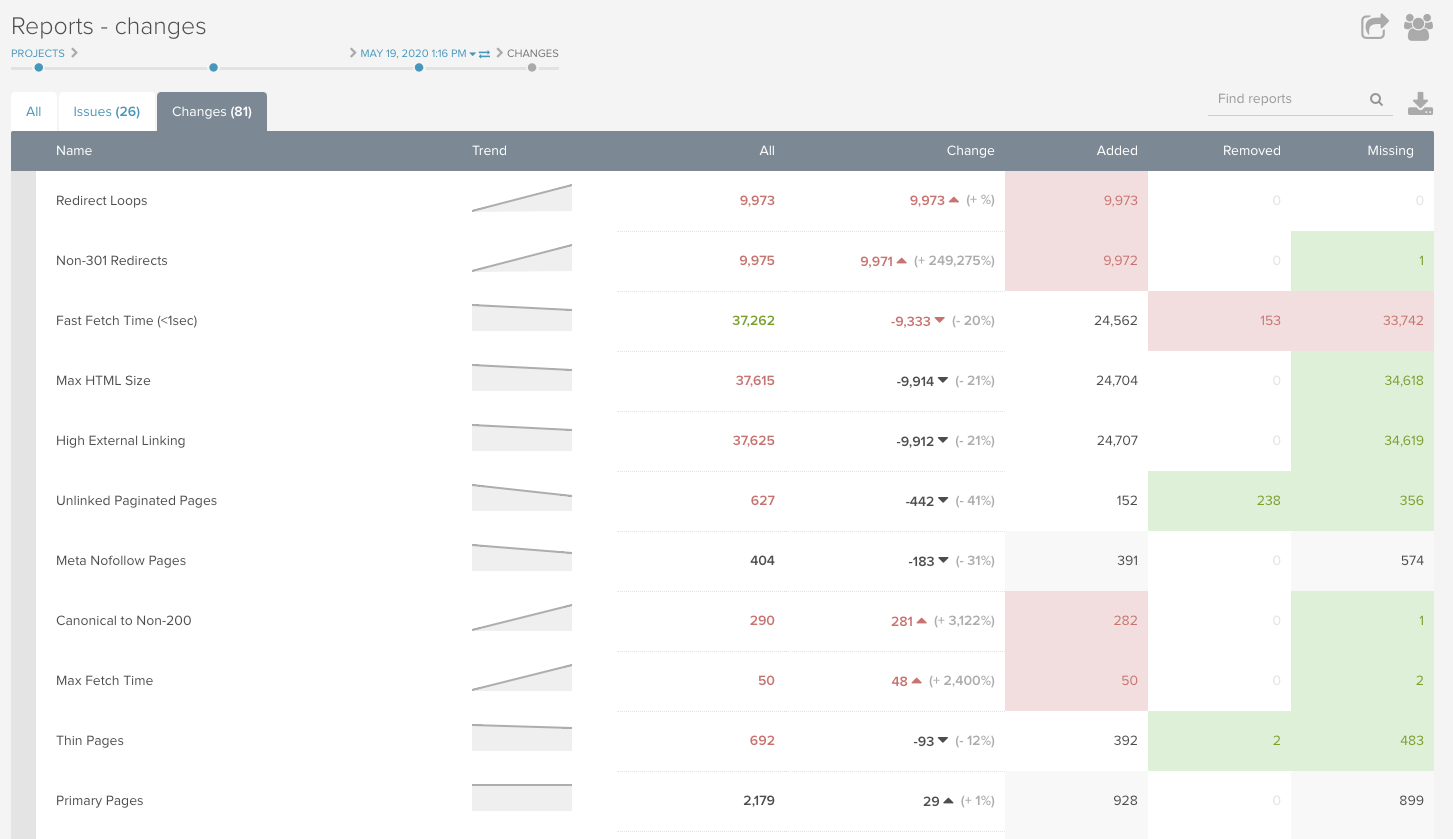
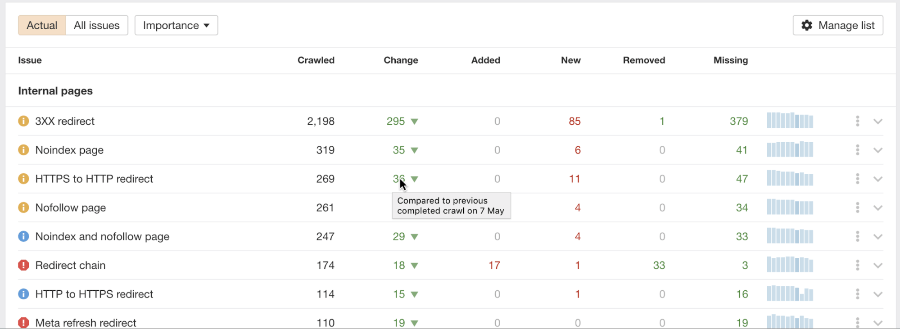
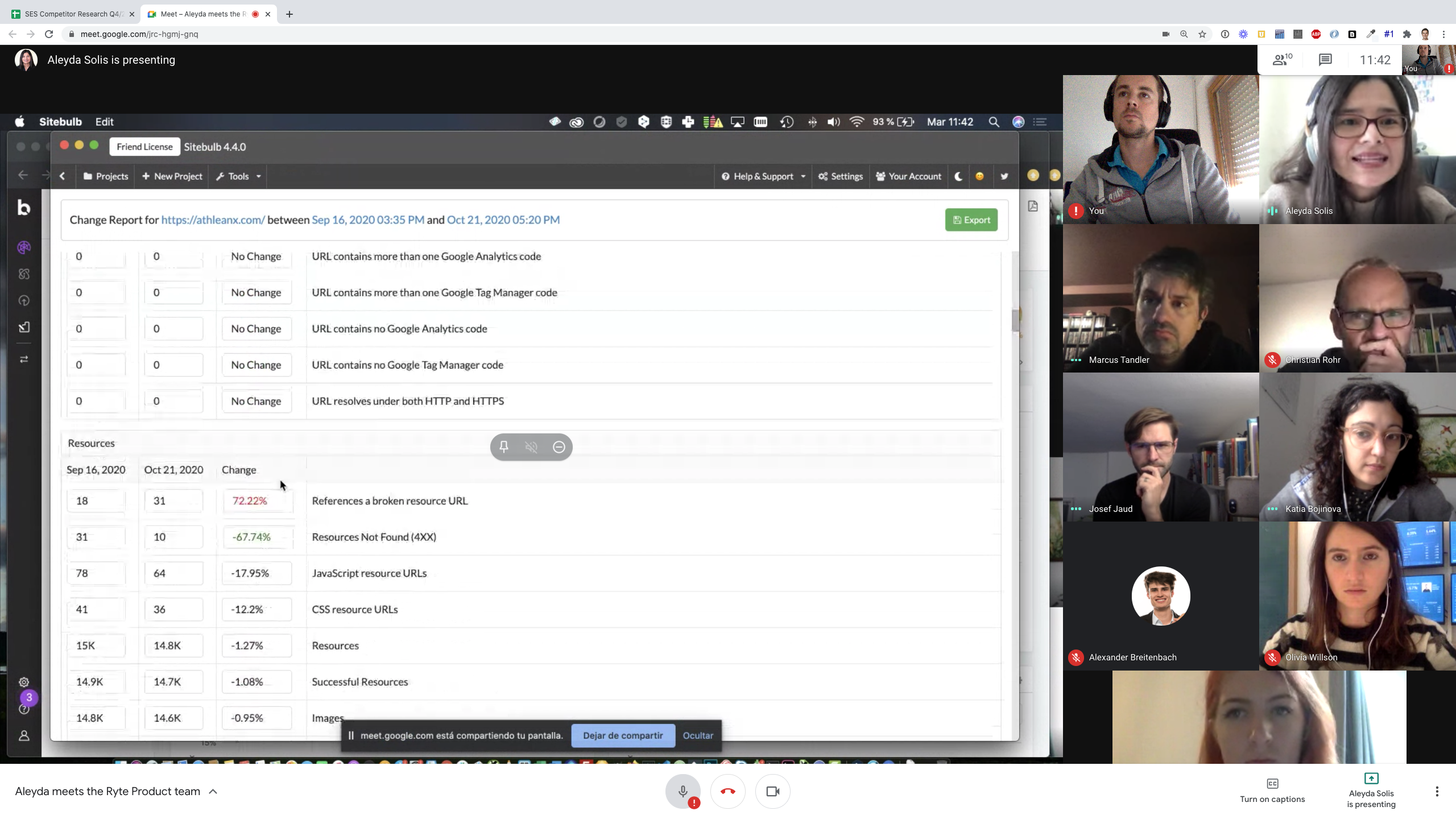
I blocked a few hours to study our competitors(direct and indirect competitors) to better understand how (and if) our competitors solved this problem and what strategies or inspirations could be drawn from their approach:
- Deep Crawl:
- Ahrefs
- Sitebulb
Competitive Research



50%
Extroverted




50%
Extroverted


Deepcrawl
shows new issues
Resolved issues
shows trend
Shows newly crawled issues
ahrefs
Sitebulb



Visual Characteristics:
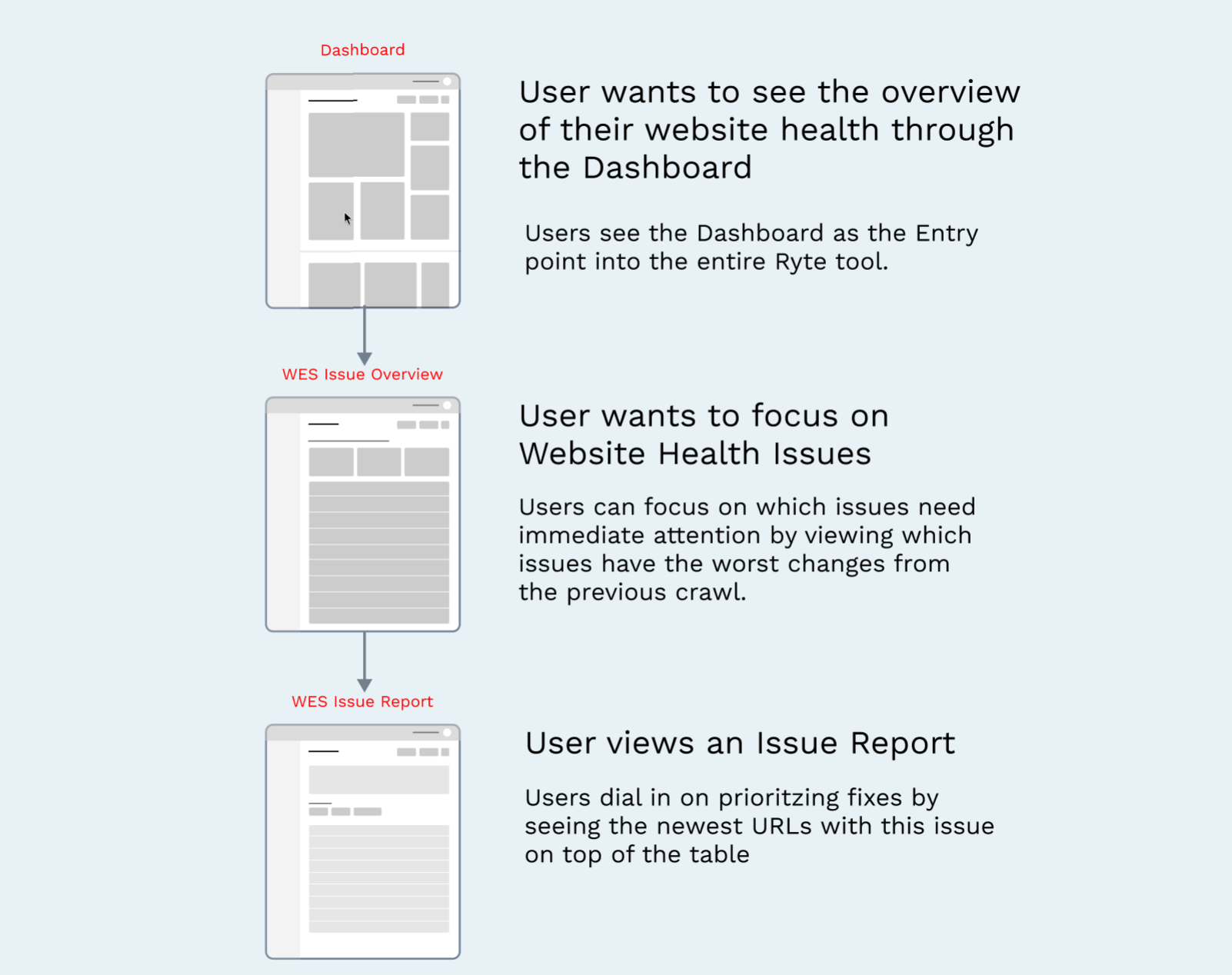
- Summarised User Flow
After mapping out User benefits, Business value, Customer profile and Target User Groups for this feature, conducting some competitor research, I mapped out a user flow to guide my designs:
.
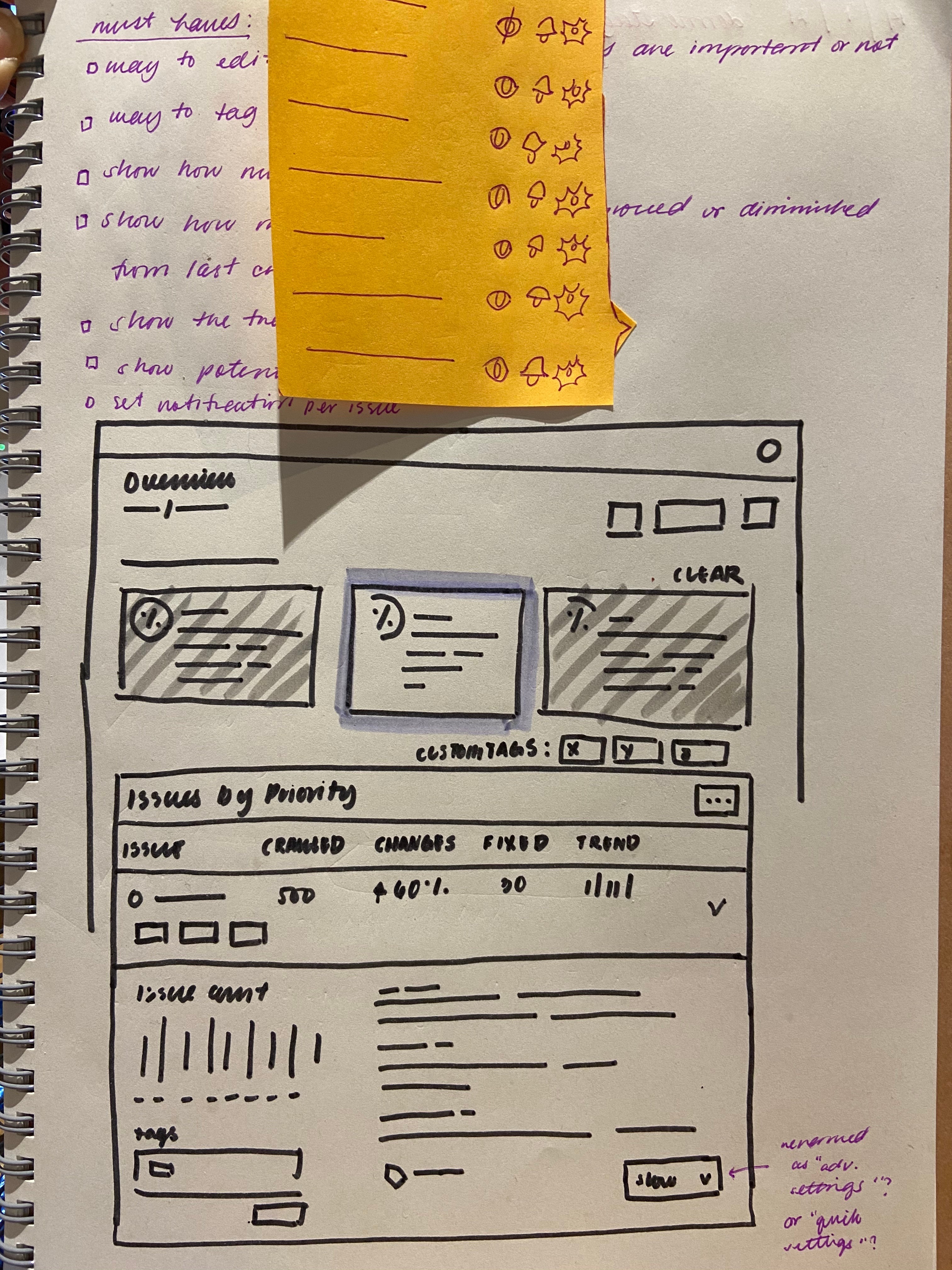
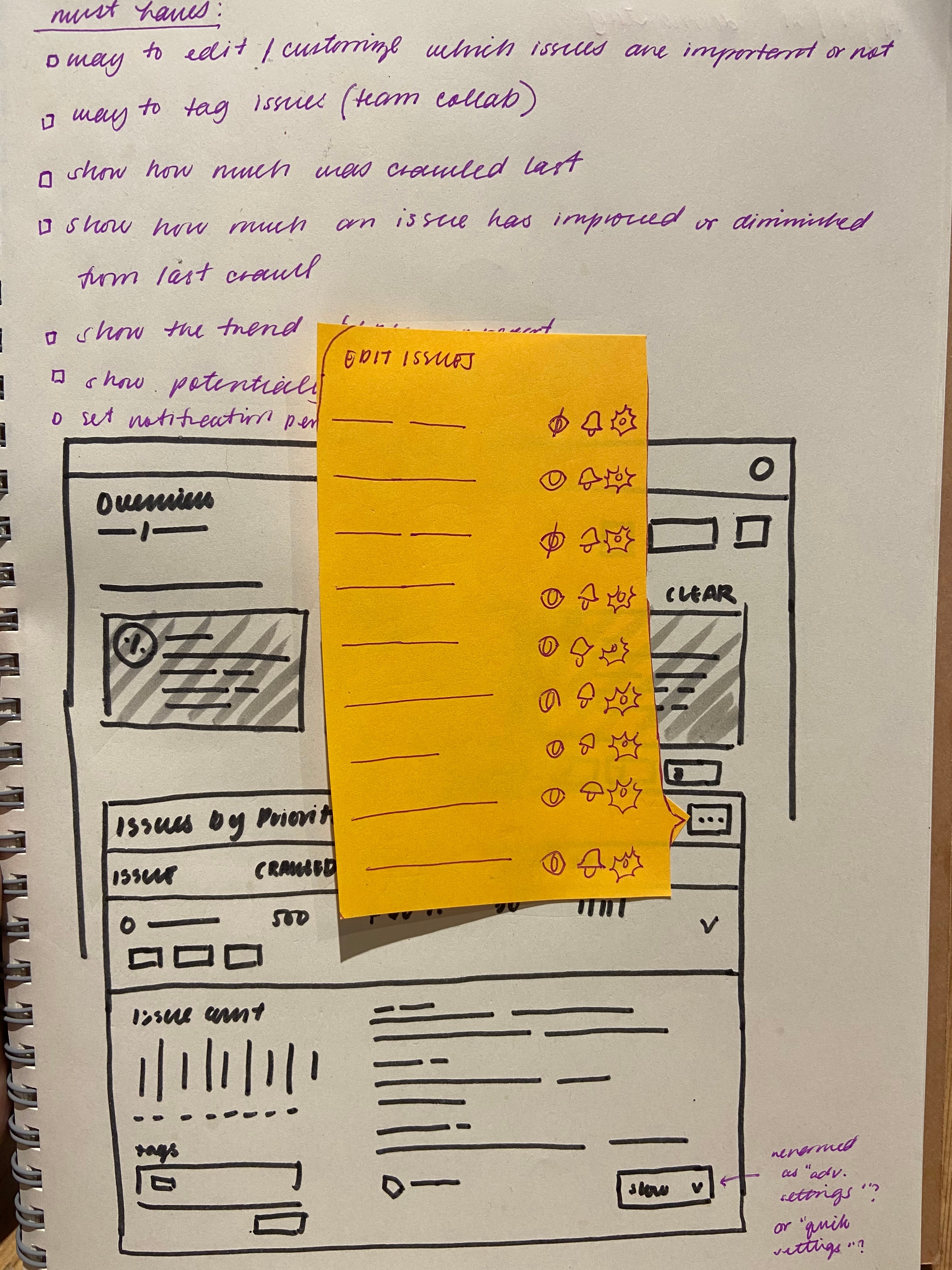
- Bringing collated ideas to life with Wireframes:
.
Getting to work:

STEP 1
STEP 4
STEP 2
STEP 5
STEP 3
STEP 6
Research
Design Exploration
Principles
Design Refinement
User Journey
Handoff and Monitoring
Understanding more about the problem
space, considering potential solutions and
learning about the customer
Diverging wide and exploring a range of
possible solutions. Testing, iterating, dis-
cussing and working through the problem
Crafting design principles to help guide
project and experience decisions, and to
ensure alignment amongst the team.
Refining a chosen direction and polishing
visual design, preparing designs for
engineering handoff and documenting
decisions made.
Diving deep into the user journey and
exploring user stories, personas, channels
and user decision making.
Working closely with engineering and product
to ensure a successful handoff and implementation
process. Just because a project is live doesn’t mean
the work is done. We monitor its performance to discover
ideas for improvement



1st Design Iteration:
Show All Issues

Your biggest issues by priority





Show All Issues
Ignored Issues

Layout and design errors (broken CSS files)


Send to dev team
Show All Issues
Ignored Issues
Issues marked as “Ignore” will show here

Broken Redirects
Pages over 1 MB
Internal Temporary Redirects
Broken Pages
No Index / No Follow
Non-indexable pages in the Sitemap.xml
Pages with invalid canonicals

24353 New
24353 New
12 New
12 New
2 New
12 New
Important!!
Important!!
Important!!
Done
Important!!
Important!!
Send to dev team
Send to dev team
Filter by:
Important!!
Send to dev team
Done

Website Quality
Content Quality
SEO


10%
-5%
+25%
55%
100%
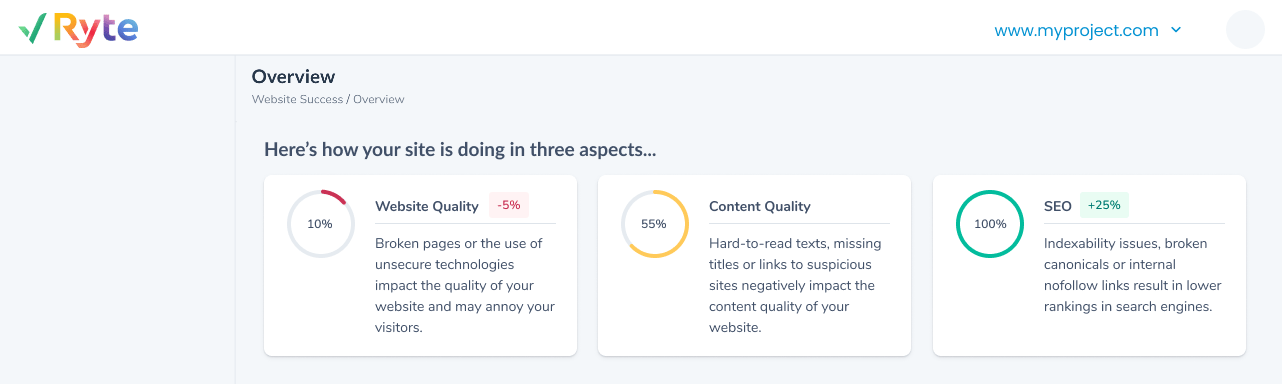
Here’s how your site is doing in three aspects...


www.myproject.com


- Add Descriptive text to Website Quality, Content Quality and SEO Score cards for better clarity:
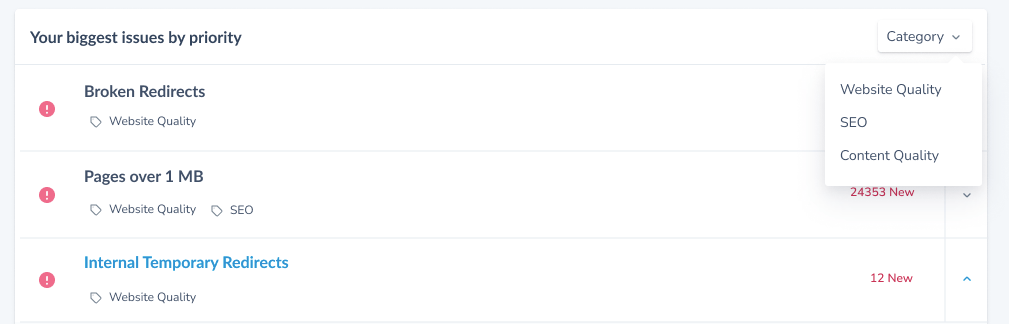
- Change Filter criteria from “Filter by Tags” to “Filter by Category” to better fit user needs:
- Minimize “Ignore this Issue” Functionality and change copy to “Skip Issue”:
Incorporating Stakeholder/User Feedback:


50%
Extroverted


50%
Extroverted
customer profile

👤Target User Group
🧳💼 Package
Technical SEOs

Basic
Website Owners
Business
Enterprise
All Users
All Packages
1




50%
Extroverted


50%
Extroverted
customer profile

👤Target User Group
🧳💼 Package
Technical SEOs

Basic
Website Owners
Business
Enterprise
All Users
All Packages
1




50%
Extroverted


50%
Extroverted
customer profile

👤Target User Group
🧳💼 Package
Technical SEOs

Basic
Website Owners
Business
Enterprise
All Users
All Packages
1


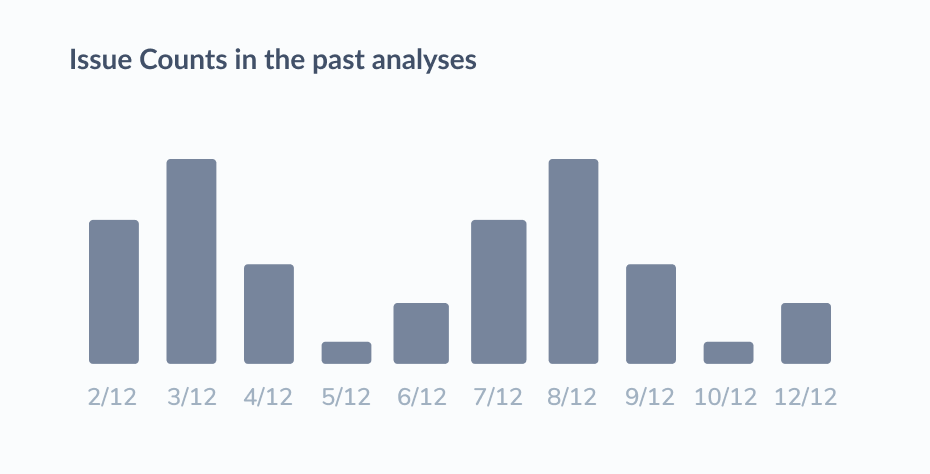
- “Set alert” functionality to be removed as users
found it unimportant:
- Design changes for the “Bar charts” to make them
stand out:


50%
Extroverted


50%
Extroverted
customer profile

👤Target User Group
🧳💼 Package
Technical SEOs

Basic
Website Owners
Business
Enterprise
All Users
All Packages
1



50%
Extroverted


50%
Extroverted
customer profile

👤Target User Group
🧳💼 Package
Technical SEOs

Basic
Website Owners
Business
Enterprise
All Users
All Packages
1


2nd Design Iteration:
230 resolved
120 resolved
4 new errors
24353
24353
12
Show All Issues

Your biggest issues by priority

What is the issue?
Why is it bad?
How to fix
An internal temporary redirect indicates that the page the user or search engine is trying to access has been temporarily moved to a different location.
Since search engines assume that temporary redirects will soon be removed, no ranking potential will be transferred to these pages.
Change the redirect (https://en.ryte.com/wiki/Redirect) from temporary to permanent to send the appropriate signals to search engines. Ideally, you'll even change all internal links that point to the redirects directly to the landing pages.
Issues in past analyses

2/12
3/12
4/12
5/12
6/12
7/12
8/12
Website Quality

Website Quality
SEO
Website Quality
Website Quality
Website Quality
Website Quality
SEO
Content Qulaity


Broken Redirects
Pages over 1 MB
Internal Temporary Redirects
Broken Pages
No Index / No Follow
Non-indexable pages in the Sitemap.xml
Pages with invalid canonicals



Website Quality
Content Quality
SEO
Broken pages or the use of unsecure technologies impact the quality of your website and may annoy your visitors.
Hard-to-read texts, missing titles or links to suspicious sites negatively impact the content quality of your website.
Indexability issues, broken canonicals or internal nofollow links result in lower rankings in search engines.


10%
-5%
+25%
55%
100%

Here’s how your site is doing in three aspects...
Category


www.myproject.com


2 resolved
no changes
4 new errors
12
2
12
Show URLs Affected
Skip Issues
Live Design Preview:
- Design iterations and feedback incorporation is highly important to get the best results and solutions for all Users.
- Alignment at every stage with stakeholders(Internal and External) is very important.
Learnings


My Certifications

Website Issue - Overview Solution
solution preview
Show All Issues
Your biggest issues by priority
Category
SEO
Content Qulaity
Broken Redirects
Pages over 1 MB
Internal Temporary Redirects
Broken Pages
No Index / No Follow
Non-indexable pages in the Sitemap.xml
Pages with invalid canonicals
24353 New
24353 New
12 New
12 New
2 New
12 New
SEO
www.myproject.com
Website Quality
Website Quality
SEO
Website Quality
Website Quality
Website Quality
Website Quality
Show All Issues
Your biggest issues by priority
Broken Redirects
Pages over 1 MB
Internal Temporary Redirects
Broken Pages
No Index / No Follow
Non-indexable pages in the Sitemap.xml
Pages with invalid canonicals
24353 New
24353 New
12 New
12 New
2 New
12 New
Important!!
Important!!
Important!!
Done
Important!!
Important!!
Send to dev team
Send to dev team
Filter by:
Important!!
Send to dev team
Done
Website Quality
Content Quality
SEO
10%
-5%
+25%
55%
100%
Here’s how your site is doing in three aspects...
www.myproject.com
230 resolved
120 resolved
4 new errors
24353
24353
12
Your biggest issues by priority
What is the issue?
Why is it bad?
How to fix
An internal temporary redirect indicates that the page the user or search engine is trying to access has been temporarily moved to a different location.
Since search engines assume that temporary redirects will soon be removed, no ranking potential will be transferred to these pages.
Change the redirect (https://en.ryte.com/wiki/Redirect) from temporary to permanent to send the appropriate signals to search engines. Ideally, you'll even change all internal links that point to the redirects directly to the landing pages.
Issues in past analyses
2/12
3/12
4/12
5/12
6/12
7/12
8/12
Website Quality
Website Quality
SEO
Website Quality
Show URLs Affected
Skip Issues
GmbH
Ryte is a web-based tool and all-in-one platform for website quality assurance and SEO. We give SEOs a holistic perspective of the overall health of their website, from addressing technical issues such as broken pages or redirects, giving legal compliance assistance under GDPR and providing performance analyses for their entire domain.
.
To provide some context;
Users are faced with 1000s of issues on their website that they need to fix:
Users spend a long time analysing issues on their website, often they can be overwhelmed by too many issues and it is difficult to identify new issues in order to focus on fixing those or to validate if old issues have been fixed.
The need to show Users what website issues to fix or focus on first
Faced with 1000s of issues to fix , Prioritising what issue to fix first was one of the biggest challenges facing website owners and Technical SEOs (our users).
Problem Statement

With the implementation of the Website issue overview feature, Users will now be able to see the URLs that newly have an issue, as well as URLs that were recently fixed, get an overview on what these issues are about and recommendations on how to fix them.
The Ryte Solution:
How does this Feature benefit our Users when implemented?
- With this feature, users can get a quick Overview of their website in terms of SEO (Search Engine Optimisation), Content and Website Quality.
- With this feature, users would be able to efficiently identify what URLs on their websites have new issues and which issues have been resolved from past check ups or crawls.
- With this feature, users would get detailed descriptions on why each identified issue is bad for their websites and fix recommendations.
- This feature affords users the capability to prioritise and focus on high priority and high risk website issues to fix.
User Benefits

What does the Business (Ryte GmbH) stand to potentially benefit from this Feature?
- Increase our conversion to upsell for free & paid users.
- Our Users get to analyse and audit their websites more often.
- The more frequently our Users analyse and audit their websites, the happier they will be and consequently more revenue for Ryte GmbH.
- Stay competitive with the features from competitors.
Business Value

What customer profile is this feature for?
Defining the Customer Profile:
customer profile
👤 Target User Group
Technical SEOs

Website Owners
🧳💼 Available to which Ryte Packages?
Basic

Business
Enterprise
Do similar implementations exist from our top 3 competitors?
I blocked a few hours to study our competitors(direct and indirect competitors) to better understand how (and if) our competitors solved this problem and what strategies or inspirations could be drawn from their approach:
- Deep Crawl:
- Ahrefs
- Sitebulb
Competitive Research



50%
Extroverted


50%
Extroverted


Deepcrawl
shows new issues
Resolved issues
shows trend
Shows newly crawled issues
ahrefs
Sitebulb


Visual Characteristics:
- Summarised User Flow
After mapping out User benefits, Business value, Customer profile and Target User Groups for this feature, conducting some competitor research, I mapped out a user flow to guide my designs:
.
- Bringing collated ideas to life with Wireframes:
.
Getting to work:

STEP 1
STEP 4
STEP 2
STEP 5
STEP 3
STEP 6
Research
Design Exploration
Principles
Design Refinement
User Journey
Handoff and Monitoring
Understanding more about the problem
space, considering potential solutions and
learning about the customer
Diverging wide and exploring a range of
possible solutions. Testing, iterating, dis-
cussing and working through the problem
Crafting design principles to help guide
project and experience decisions, and to
ensure alignment amongst the team.
Refining a chosen direction and polishing
visual design, preparing designs for
engineering handoff and documenting
decisions made.
Diving deep into the user journey and
exploring user stories, personas, channels
and user decision making.
Working closely with engineering and product
to ensure a successful handoff and implementation
process. Just because a project is live doesn’t mean
the work is done. We monitor its performance to discover
ideas for improvement



1st Design Iteration:
Show All Issues

Your biggest issues by priority





Show All Issues
Ignored Issues

Layout and design errors (broken CSS files)


Send to dev team
Show All Issues
Ignored Issues
Issues marked as “Ignore” will show here

Broken Redirects
Pages over 1 MB
Internal Temporary Redirects
Broken Pages
No Index / No Follow
Non-indexable pages in the Sitemap.xml
Pages with invalid canonicals

24353 New
24353 New
12 New
12 New
2 New
12 New
Important!!
Important!!
Important!!
Done
Important!!
Important!!
Send to dev team
Send to dev team
Filter by:
Important!!
Send to dev team
Done

Website Quality
Content Quality
SEO


10%
-5%
+25%
55%
100%
Here’s how your site is doing in three aspects...


www.myproject.com


- Add Descriptive text to Website Quality, Content Quality and SEO Score cards for better clarity:
- Change Filter criteria from “Filter by Tags” to “Filter by Category” to better fit user needs:
- Minimize “Ignore this Issue” Functionality and change copy to “Skip Issue”:
Incorporating Stakeholder/User Feedback:


50%
Extroverted


50%
Extroverted
customer profile

👤Target User Group
🧳💼 Package
Technical SEOs

Basic
Website Owners
Business
Enterprise
All Users
All Packages
1


50%
Extroverted


50%
Extroverted
customer profile

👤Target User Group
🧳💼 Package
Technical SEOs

Basic
Website Owners
Business
Enterprise
All Users
All Packages
1


50%
Extroverted


50%
Extroverted
customer profile

👤Target User Group
🧳💼 Package
Technical SEOs

Basic
Website Owners
Business
Enterprise
All Users
All Packages
1


- “Set alert” functionality to be removed as users found it unimportant:
- Design changes for the “Bar charts” to make them stand out:


50%
Extroverted


50%
Extroverted
customer profile

👤Target User Group
🧳💼 Package
Technical SEOs

Basic

Website Owners
Business
Enterprise
All Users

All Packages

1


50%
Extroverted


50%
Extroverted
customer profile

👤Target User Group
🧳💼 Package
Technical SEOs

Basic
Website Owners
Business
Enterprise
All Users
All Packages
1


2nd Design Iteration:
230 resolved
120 resolved
4 new errors
24353
24353
12
Show All Issues

Your biggest issues by priority

What is the issue?
Why is it bad?
How to fix
An internal temporary redirect indicates that the page the user or search engine is trying to access has been temporarily moved to a different location.
Since search engines assume that temporary redirects will soon be removed, no ranking potential will be transferred to these pages.
Change the redirect (https://en.ryte.com/wiki/Redirect) from temporary to permanent to send the appropriate signals to search engines. Ideally, you'll even change all internal links that point to the redirects directly to the landing pages.
Issues in past analyses

2/12
3/12
4/12
5/12
6/12
7/12
8/12
Website Quality

Website Quality
SEO
Website Quality
Website Quality
Website Quality
Website Quality
SEO
Content Qulaity


Broken Redirects
Pages over 1 MB
Internal Temporary Redirects
Broken Pages
No Index / No Follow
Non-indexable pages in the Sitemap.xml
Pages with invalid canonicals



Website Quality
Content Quality
SEO
Broken pages or the use of unsecure technologies impact the quality of your website and may annoy your visitors.
Hard-to-read texts, missing titles or links to suspicious sites negatively impact the content quality of your website.
Indexability issues, broken canonicals or internal nofollow links result in lower rankings in search engines.


10%
-5%
+25%
55%
100%

Here’s how your site is doing in three aspects...
Category


www.myproject.com


2 resolved
no changes
4 new errors
12
2
12
Show URLs Affected
Skip Issues
Live Design Preview:
- Design iterations and feedback incorporation is highly important to get the best results and solutions for all Users.
- Alignment at every stage with stakeholders(Internal and External) is very important.
Learnings

Website Issue - Overview Solution
solution preview
Show All Issues

Your biggest issues by priority

Category

SEO
Content Qulaity


Broken Redirects
Pages over 1 MB
Internal Temporary Redirects
Broken Pages
No Index / No Follow
Non-indexable pages in the Sitemap.xml
Pages with invalid canonicals
24353 New
24353 New
12 New
12 New
2 New
12 New
SEO


www.myproject.com
Website Quality
Website Quality
SEO
Website Quality
Website Quality
Website Quality
Website Quality
Show All Issues
Your biggest issues by priority
Broken Redirects
Pages over 1 MB
Internal Temporary Redirects
Broken Pages
No Index / No Follow
Non-indexable pages in the Sitemap.xml
Pages with invalid canonicals


24353 New
24353 New
12 New
12 New
2 New
12 New
Important!!
Important!!
Important!!
Done
Important!!
Important!!
Send to dev team
Send to dev team
Filter by:
Important!!
Send to dev team
Done
Website Quality
Content Quality
SEO


10%
-5%
+25%
55%
100%
Here’s how your site is doing in three aspects...


www.myproject.com
230 resolved
120 resolved
4 new errors
24353
24353
12
Your biggest issues by priority

What is the issue?
Why is it bad?
How to fix
An internal temporary redirect indicates that the page the user or search engine is trying to access has been temporarily moved to a different location.
Since search engines assume that temporary redirects will soon be removed, no ranking potential will be transferred to these pages.
Change the redirect (https://en.ryte.com/wiki/Redirect) from temporary to permanent to send the appropriate signals to search engines. Ideally, you'll even change all internal links that point to the redirects directly to the landing pages.
Issues in past analyses

2/12
3/12
4/12
5/12
6/12
7/12
8/12
Website Quality
Website Quality
SEO

Website Quality
Show URLs Affected
Skip Issues
GmbH
Ryte is a web-based tool and all-in-one platform for website quality assurance and SEO. We give SEOs a holistic perspective of the overall health of their website, from addressing technical issues such as broken pages or redirects, giving legal compliance assistance under GDPR and providing performance analyses for their entire domain.
.
To provide some context;
Users are faced with 1000s of issues on their website that they need to fix:
Users spend a long time analysing issues on their website, often they can be overwhelmed by too many issues and it is difficult to identify new issues in order to focus on fixing those or to validate if old issues have been fixed.
The need to show Users what website issues to fix or focus on first
Faced with 1000s of issues to fix , Prioritising what issue to fix first was one of the biggest challenges facing website owners and Technical SEOs (our users).
Problem Statement

With the implementation of the Website issue overview feature, Users will now be able to see the URLs that newly have an issue, as well as URLs that were recently fixed, get an overview on what these issues are about and recommendations on how to fix them.
The Ryte Solution:
How does this Feature benefit our Users when implemented?
- With this feature, users can get a quick Overview of their website in terms of SEO (Search Engine Optimisation), Content and Website Quality.
- With this feature, users would be able to efficiently identify what URLs on their websites have new issues and which issues have been resolved from past check ups or crawls.
- With this feature, users would get detailed descriptions on why each identified issue is bad for their websites and fix recommendations.
- This feature affords users the capability to prioritise and focus on high priority and high risk website issues to fix.
User Benefits

What does the Business (Ryte GmbH) stand to potentially benefit from this Feature?
- Increase our conversion to upsell for free & paid users.
- Our Users get to analyse and audit their websites more often.
- The more frequently our Users analyse and audit their websites, the happier they will be and consequently more revenue for Ryte GmbH.
- Stay competitive with the features from competitors.
Business Value

What customer profile is this feature for?
Defining the Customer Profile:
customer profile
👤 Target User Group
Technical SEOs

Website Owners
🧳💼 Available to which Ryte Packages?
Basic
Business
Enterprise
Do similar implementations exist from our top 3 competitors?
I blocked a few hours to study our competitors(direct and indirect competitors) to better understand how (and if) our competitors solved this problem and what strategies or inspirations could be drawn from their approach:
- Deep Crawl:
- Ahrefs
- Sitebulb
Competitive Research



50%
Extroverted


50%
Extroverted


Deepcrawl
shows new issues
Resolved issues
shows trend
Shows newly crawled issues
ahrefs
Sitebulb


Visual Characteristics:
- Summarised User Flow
After mapping out User benefits, Business value, Customer profile and Target User Groups for this feature, conducting some competitor research, I mapped out a user flow to guide my designs:
.
- Bringing collated ideas to life with Wireframes:
.
Getting to work:

STEP 1
STEP 4
STEP 2
STEP 5
STEP 3
STEP 6
Research
Design Exploration
Principles
Design Refinement
User Journey
Handoff and Monitoring
Understanding more about the problem
space, considering potential solutions and
learning about the customer
Diverging wide and exploring a range of
possible solutions. Testing, iterating, dis-
cussing and working through the problem
Crafting design principles to help guide
project and experience decisions, and to
ensure alignment amongst the team.
Refining a chosen direction and polishing
visual design, preparing designs for
engineering handoff and documenting
decisions made.
Diving deep into the user journey and
exploring user stories, personas, channels
and user decision making.
Working closely with engineering and product
to ensure a successful handoff and implementation
process. Just because a project is live doesn’t mean
the work is done. We monitor its performance to discover
ideas for improvement



1st Design Iteration:
Show All Issues

Your biggest issues by priority





Show All Issues
Ignored Issues

Layout and design errors (broken CSS files)


Send to dev team
Show All Issues
Ignored Issues
Issues marked as “Ignore” will show here

Broken Redirects
Pages over 1 MB
Internal Temporary Redirects
Broken Pages
No Index / No Follow
Non-indexable pages in the Sitemap.xml
Pages with invalid canonicals

24353 New
24353 New
12 New
12 New
2 New
12 New
Important!!
Important!!
Important!!
Done
Important!!
Important!!
Send to dev team
Send to dev team
Filter by:
Important!!
Send to dev team
Done

Website Quality
Content Quality
SEO


10%
-5%
+25%
55%
100%
Here’s how your site is doing in three aspects...


www.myproject.com


- Add Descriptive text to Website Quality, Content Quality and SEO Score cards for better clarity:
- Change Filter criteria from “Filter by Tags” to “Filter by Category” to better fit user needs:
- Minimize “Ignore this Issue” Functionality and change copy to “Skip Issue”:
Incorporating Stakeholder/User Feedback:


50%
Extroverted


50%
Extroverted
customer profile

👤Target User Group
🧳💼 Package
Technical SEOs

Basic
Website Owners
Business
Enterprise
All Users
All Packages
1


50%
Extroverted


50%
Extroverted
customer profile

👤Target User Group
🧳💼 Package
Technical SEOs

Basic
Website Owners
Business
Enterprise
All Users
All Packages
1


50%
Extroverted


50%
Extroverted
customer profile

👤Target User Group
🧳💼 Package
Technical SEOs

Basic
Website Owners
Business
Enterprise
All Users
All Packages
1


- “Set alert” functionality to be removed as users found it unimportant:
- Design changes for the “Bar charts” to make them stand out:


50%
Extroverted


50%
Extroverted
customer profile

👤Target User Group
🧳💼 Package
Technical SEOs

Basic
Website Owners
Business
Enterprise
All Users
All Packages
1


50%
Extroverted


50%
Extroverted
customer profile

👤Target User Group
🧳💼 Package
Technical SEOs

Basic
Website Owners
Business
Enterprise
All Users
All Packages
1


2nd Design Iteration:
230 resolved
120 resolved
4 new errors
24353
24353
12
Show All Issues

Your biggest issues by priority

What is the issue?
Why is it bad?
How to fix
An internal temporary redirect indicates that the page the user or search engine is trying to access has been temporarily moved to a different location.
Since search engines assume that temporary redirects will soon be removed, no ranking potential will be transferred to these pages.
Change the redirect (https://en.ryte.com/wiki/Redirect) from temporary to permanent to send the appropriate signals to search engines. Ideally, you'll even change all internal links that point to the redirects directly to the landing pages.
Issues in past analyses

2/12
3/12
4/12
5/12
6/12
7/12
8/12
Website Quality

Website Quality
SEO
Website Quality
Website Quality
Website Quality
Website Quality
SEO
Content Qulaity


Broken Redirects
Pages over 1 MB
Internal Temporary Redirects
Broken Pages
No Index / No Follow
Non-indexable pages in the Sitemap.xml
Pages with invalid canonicals



Website Quality
Content Quality
SEO
Broken pages or the use of unsecure technologies impact the quality of your website and may annoy your visitors.
Hard-to-read texts, missing titles or links to suspicious sites negatively impact the content quality of your website.
Indexability issues, broken canonicals or internal nofollow links result in lower rankings in search engines.


10%
-5%
+25%
55%
100%

Here’s how your site is doing in three aspects...
Category


www.myproject.com


2 resolved
no changes
4 new errors
12
2
12
Show URLs Affected
Skip Issues
Live Design Preview:
- Design iterations and feedback incorporation is highly important to get the best results and solutions for all Users.
- Alignment at every stage with stakeholders(Internal and External) is very important.
Learnings